Thursday, July 18, 2019

Anker Alkaline 24-Count AA Batteries

Anker Alkaline 24-Count AA Batteries

Though I was not planning on getting these Anker Alkaline batteries, since I anyway needed to buy some for home, and after reading some of highlights in the community - decided to buy these. Bought Anker AA 24-Pack batteries from Amazon during a deal for $8.47 with 47% off coupon, with regular price being $15.99.
This is simple review, more of layman terms, understandable by anyone looking for AA / Double AA batteries for devices such as Remotes, Clocks, Toys.

Packaging

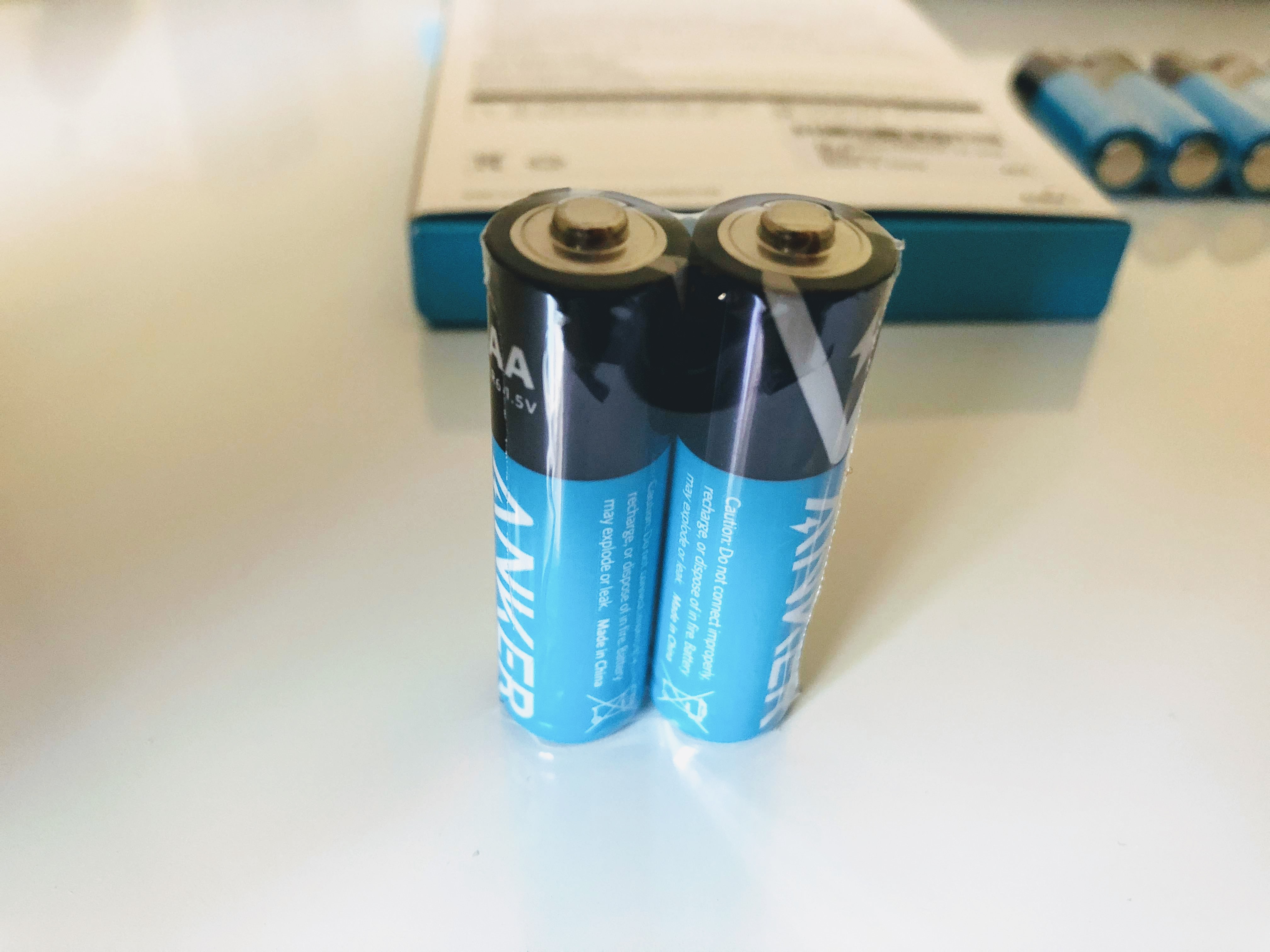
The batteries came in signature Anker Packaging in White-Blue composure with 24 Anker Batteries paired in small packs of 2 each, Happy Card with Anker support details (been included since almost the first Anker products.


The best part from observation of un-boxing is the packs of 2 batteries, so that we open the packs only when needed, rather than opening the entire stack / seal of batteries… makes it easier to store stack the batteries in the Anker box in which it came or battery stash at home.
Price

Anker Alkaline AA 24-count batteries are priced at $15.99 on Amazon (with 47% discount available as of writing this review). I bought these for the discounted price at $8.50, with the discount, this is good deal.
In market, however there are other brands sold at wholesale such as Duracell AA Alkaline 40-count batteries at $16.99, Kirkland AA Alkaline 72-count batteries at $19.99. However considering the features implemented in Anker Batteries, it is worth investing in Anker Brand. Now that I got the 24-count pack, will not be going for more batteries for at least next 9 to 12 months.

Features

The main killer feature highlighted on Anker AA / AAA batteries is the 10-year shelf life, meaning Anker Alkaline batteries can sit on the shelf for up to 10 years without losing their power. In the past, I have bought these disposable battery packs and since these were not used for more than a year of so, have seen some leak, die out soon.
Only way to test the 10 year shelf life, is to keep these batteries (will make sure to keep at least 1) for 10 years, I will write a follow-up review in 10 years from now :wink:
The other 2 features I was interested are Adaptive Power & PowerLock
Anker has built Adaptive Power, into these Alkaline batteries delivering only the power that the device requires, received positive / satisfactory response from Anker on my query how these worked, which prompted me to go for these batteries (you can read here),
PowerLock is the other feature which prevents any leaks and secures power inside the battery case.
Other listed features can be found here

Testing

For now have used the batteries for my home clocks (3 clocks with 1 battery each), Roku 2XS Bluetooth remote (2 count), since these are considered as low-drain devices, these should drain little power and should last longer.
Have also put 2 of these into Logitech Harmony Remote (replaced the rechargeable batteries with Anker AA batteries) since this remote is heavily used. I usually recharge the Logitech remote once in 15 days, so should be able to find out how long Anker AA batteries last.
Will post updates in this space.

Expectation, Final Lines

Coming from Anker brand known for great powerbanks and leader in charging technology (wired / wireless), I had expected Rechargeable batteries, however there are small steps to be taken before bigger ones, hopefully Anker comes up with rechargeable AA / AAA batteries with options of recharging via Micro-USB, USB-C,… (or Wireless charging… Anker can always surprise us :slight_smile: )
I strongly suggest buying these Anker AA batteries from Amazon for the discount deals going on for AA (47% discount coupon) / AAA (50% discount coupon) batteries

Purchase


Monday, July 1, 2019

Anker PowerLine II 3-in-1 Cable Lightning/Type C/Micro USB Cable

Anker came-up with the One for All Cable - greatly helps reducing clutter and need for 3 separate cables. The product (White or Black cable) comes packed in a small box with Signature Anker packaging in blue color with happy (Warranty card), have the White cable for review here.


Have been using the Anker 3-in-1 White Cable for for almost a year, and it is still going strong, with the connector heads changed from / to Lightening to USB-C. Main cable lead is a Micro USB head, with the other Lightening and USB-C connectors attached with durable connectors. 


I use the cable to charge iPhone and Samsung S8/S9, as well as Bluetooth Headsets (used Anker Soundbuds Rise Wireless headset here) interchanging multiple times during the day, and not see cable or cable connectors showing any fatigue after many bends and pulls. Cable itself is 3 ft in length and good for carrying in laptop carry-case / back packs for commutes, and also on office desks charging devices, usually iPhone, wireless headsets and battery power packs, and a great companion with PowerCore 5000 portable power bank.


For connecting the lightning or USB-C heads, it important to make sure the "Anker" Logo faces you, with connector attachment coming from the right hand side, this is designed and aligned in a way to ease the connections. Note that only 1 device can be charged at any time, based on the connector head attached (iOS / USB-C devices) or using the Micro USB head. 


Cable with Lightening connector can be used to charge the iOS device as well as Data transfer, i use it with iTunes to transfer data / media. Same with Samsung S8/S9, charges the device as well as assists in data transfer. There is a Velcro Anker cable strap, ties the cable together. 


Have used other PowerLine series cables from Anker, and this is an addition to the list with an exceptional quality, reducing the cable clutter!

Anker Powerline II 3-in-1 Cable, Lightning/Type C/Micro USB Cable is available on Amazon in Black and White colors.


Thursday, June 27, 2019

Anker #OneCharger #UseAnkerInstead Contest (Chance to Win All New USB-C Gear)


Lot of microusb, usb, miniusb cables and more, power adapter, chargers, ... just too much! Time to let go and go sleek with Anker Solutions for charging!!


Go here for a chance to win from Anker!

Tuesday, June 18, 2019

Review: Anker PowerPort+ Atom III (2 ports)

This is my review for Anker PowerPort+ Atom III (2 Ports), will go over packaging, un-boxing, Wall charger looks / appearance, usage and testing in next few lines.


Package / Unboxing:

Package came in a Signature Blue Anker Box with Power Port+ Atom III (Two Ports) charger, welcome guide, Happy Card (warranty card).


PowerPort+ Atom III Wall Charger :

Its a Small form factor wall charger with USB-A Port and USB-C, which combined provide 60W. Anker has mentioned to use the GaN technology which reduces the size from similar Anker earlier. The charger has fold-able Plug and I really like this feature along with the small size, making it travel friendly. Plugs are firm and do not easily collapse. There is a faint blue light indicator, which comes up if the charger is in use.


The USB-A port provides PowerIQ 2.0, Anker's fast charging providing upto 18W -- Used this to charge my iPhone 8 and Samsung S8. The USB-C Port provides PowerIQ 3.0 - universal full-speed with support for Qualcomm Quick Charge and USB-C Power Delivery with a maximum output of 45W -- used this to charge my Lenovo Laptop T470S at home / T480 at work(used it with an Apple USB-C cable). Will not talk much on this topic and GaN technology, you may read more on this link on Anker


Usage:

Have been using this charger extensively during my recently concluded trip to San Diego for a networking conference, right from the airport to the Hotel Room to conference breakout Sessions, used PowerPort Atom III to charge my laptop as well as iPhone at the same time. Also, used this charger to connect to the PowerWave+ Pad with Apple Watch Holder at hotel to charge iPhone and Apple watch.


Testing:

During the testing, found the Laptop pulled only 18.96W from USB-C with / without the USB-A port being used and maximum 9.11W from USB-A port for charging iPhone as well as S8.


I will plan to get the Anker PowerLine Series USB-C & USB-C Cable with Lightning Connector to see if it makes any difference to the charging and power output and update this post at a later time.

One observation for single port used at a time (USB-C / USB-A), the charger was not getting warm, but using both ports for charging at the same time, got the charger a bit warm, and this is expected, and YMMV based on usage.


Charging Times:

For the testing / checking on charging time, drained my laptop T470s and iPhone 8 completely to have them die down completely and started charging using the PowerPort+ Atom III.

Laptop took around 2hr 45min to full charge, charging at 18.96W (though I feel this should be 18W maximum), iPhone 8 took 1hr 45min to 100% charge, with battery iPhone Battery charged to 15% in 5min, 35% in 30min :)


Laptop Charging


iPhone Charging Time


Devices used for Testing:
Lenovo T470s / T480
iPhone 8
Samsung S8
Apple USB-C Cable
Anker 3-in-1 PowerLine II Cable with Lightening / USB-C Cable.


Final Lines:

PowerPort+ Atom III (2 ports) has been a great addition to my list of chargers, providing maximum flexibility and helped reduce the weight in my laptop backpack, effectively replacing my regular laptop charger and mobile charger / watch charger to a single charger. Overall, this is a good portal charger and ideal for on-the-go travel users.

If you are interested in PowerPort+ Atom III, below are the product link

Anker Link

Amazon Link


Sunday, April 7, 2019

Eufy Lumos Smart Bulb

Lumos from Eufy is Smart Bulb which is a White, Soft White (2700K) 9Watt LED unit, which connects and operates Eufy app and integrates smoothly with Amazon Alexa & Google Assistant. This came with Orange Happy card similar to the Parent company Anker's Blue Happy Card, Specification, and User manual on setup. This is a dimmable LED smart bulb and works efficiently with the dimming option on the eufy app. Product mentions 800 lumens of brightness and works great for small to medium rooms. Set up was very easy - install the bulb on the bulb holder power socket, use the Eufy App on iOS (also tested with Eufy Android), connect the Lumos bulb to Wi-Fi for internet access using the Eufy App and then control the bulb from the Eufy App. After the first time setup, the app prompted for firmware upgrade for the smart bulb, and this was quick, may be 2-3 minutes. Integration with Amazon Alexa and Google assistant is easy. From Alexa and / or Google Home app, search and enable the skill (on Alexa) or Add Device from Google Home and enable the authentication with the Eufy with the user credential used to setup the Lumos initially. We use Google Home & Mini, Echo and Fire TV, and these devices provide easy voice access to control the Lumos. Bulb remembers the dimness level when turned off and on, so need to change the brightness it is required to instruct the voice assistant or schedule the brightness with Eufy App.

Best part for this smart bulb is it does not need a separate hub, and works directly with the Eufy app. using voice assistant (google and amazon), am able to turn ON, oFF the light as well as dim / brighten the lighting which is pretty convenient considering I use it for the bedroom. App has options on Favorites to set with specific brightness, has schedules when the bulb can turn on or off. Need eufy to enable the Sunrise / Sunset option for the app, would be awesome. As long as the Lumos is connected to internet via Wi-Fi, we can control it over the Wi-Fi as well as over the app over Cellular LTE connection (yaayy!!!). With the schedules, it is easy to set the wake up time for morning as well as for night time, with reduced brightness (dimming) with the app. There can be up to 10 schedules which may be configured, I have done only 3 and meets my requirement. With the sharing option, have given permissions to my wife to control the bulb from her phone as well. App has the favorites option, which lets you add options for brightness levels and quickly apply the setting, with up to 30 favorite light settings, 3 to 5 settings suffice for most people, I myself have only 3 favorites set for 1% (completely dim), 50% and 100% (brightest). There is separate option called as Away mode, when the bulb turns on or off randomly for the set duration, good security feature to keep people guessing you may be at home when actually you are not at home, with repeat settings.

I have attached some pictures for the Lumos bulb and pictures from the app itself. This is pretty good for people wanting to invest in Smart Homes, and looking for voice based activities.


Note: Make sure you have 2.4GHz Wifi setup ready and available, and have your phone, eufy Lumos close to your home Wifi Router when you set up for the first time, this really helps speedup the setup!


https://drive.google.com/uc?export=view&id=1bfbFNrR94ssiXSzK-MgNPe13KoGHDq11https://drive.google.com/uc?export=view&id=1PG8VUp0Y-mci1rhGNCsV2zecZNefhegDhttps://drive.google.com/uc?export=view&id=1pA3eDKGHGYeASxXCdxKv9bli0ImtNOKwhttps://drive.google.com/uc?export=view&id=1Tw9HuYgIPkl6yE9CE4EAkJeYGt7Re-Erhttps://drive.google.com/uc?export=view&id=1vfcjhg7DK7Hut-r2RVjHbHotLeandGoNhttps://drive.google.com/uc?export=view&id=1w3TotkN-UZrhQbIWnfgHnx5LPuCkoIdB

Friday, April 5, 2019

Anker PowerWave+ Pad with Apple Watch Holder

Writing the review for Anker PowerWave+ with Watch Holder, do let me know your thoughts / inputs in comments


Packaging & Un-boxing 

Let me start with the packaging for PowerWave+ Pad. The product came in perfect packing (as always by Anker), neat and impressive packaging in Blue color. Package box Included PowerWave+ Pad, PowerPort+ 1 with Quick Charge 3.0 wall charger, 6ft PowerLine micro USB cable with Velcro band, PowerWave+ Pad Quick Reference Guide, Anker Support Manual & a Happy Card which is a Anker Signature item, is included in almost all of Anker / Anker Brand items with support contact.


Appearance

First thing which comes across a highlight when you open the box is the looks and build of the PowerWave+ Pad, has a fine appearance and finishing. PowerPort+ Wall Charger looks like a solid block, matches the color aesthetics of the pad, has fold-able power prongs. Watch Holder has a nice clear cut out from the pad. PowerWave+ pad has the large round charging Pad for iPhone on the left and Watch holder is on the right side with LED Charging indicator in the bottom center of the face, properly spaced for ease of placing both iPhone and apple watch. There is no charging indication on the PowerPort+ wall charger. Source Input 


Setting up the PowerWave+ Pad
The pad opens up easily with it flipped, there are directions shown on the pad to open it, with the flap coming off easily. It has Smart Cable management system helps avoid cable tangle, designed well to wrap the cable within the case and the Apple Watch Charger Dongle fits perfectly within the holder.

https://drive.google.com/uc?export=view&id=1c6fltbaCTtXWzPVq9YSSueMWGOd8KmoQ

https://drive.google.com/uc?export=view&id=1D1SwQc95uFMIzbZql8kYTCIyGdqSW9nR
https://drive.google.com/uc?export=view&id=1Yu66yzuwhL3DS2gQnz9i8EY7MPuOlhUk

Usage

Tested the PowerWave+ Pad with Apple iPhone 8 (iOS 12.2) & Apple Watch Series 3 (WatchOS 5.2). Charging the iPhone & Apple Watch were simple, with the PowerWave+ pad connected to the PowerPort by the provided Micro-USB cable. The Charging LED light is not too bright, does not distract at night. Have charged both my iPhone and apple watch simultaneously, using up single power source, saving need for additional wall power socket as well as side table space. Had to remove my phone case (which has metal plate for car dashboard magnetic holder), was worthwhile to keep the case on initially - the LED light kept flashing while charging, indicating the phone was not charging, removed the case later to set it to charging. Apple Watch charge well with the holder popped-in. Pop-up of holder makes it double up as night stand - though I don’t use this much, want the room as dark as possible :slight_smile: I place watch on the charger laid down flat. The sleek, lean design makes it convenient for travel.


https://drive.google.com/uc?export=view&id=1qM_ZujZXDR6ynJfe4EBrcLZ9vMTnbXdH

https://drive.google.com/uc?export=view&id=1rNCoDGSSPq0IEBlIe5ulH9u0ItGB9zmx


Need for Improvements for PowerWave+ Pad 


  • PowerWave+ pad does not include the apple watch charging dongle, and need to connect this separately... would have loved to have used this already included.
  • Provide a PowerWave+ in Color Black. Both my iPhone and Apple Watch are Space Gray, would really like to have a matching color scheme.
  • Provide USB-C port instead of Micro-USB :slight_smile:
  • Include option for Power Out port ( Micro-USB or USB – C) to let other devices to connect such as Anker Soundcore Spirit X or Curve headset   


Mighty Anker PowerExtend 12 Strip

  Mighty Anker PowerExtend 12 Strip : Review Product came in Anker’s Signature White-Blue box image.jpg 1296×440 223 KB Contents in the box ...